Pine64 SoQuartz (RK3566)
===
### Install OS / headless installation
[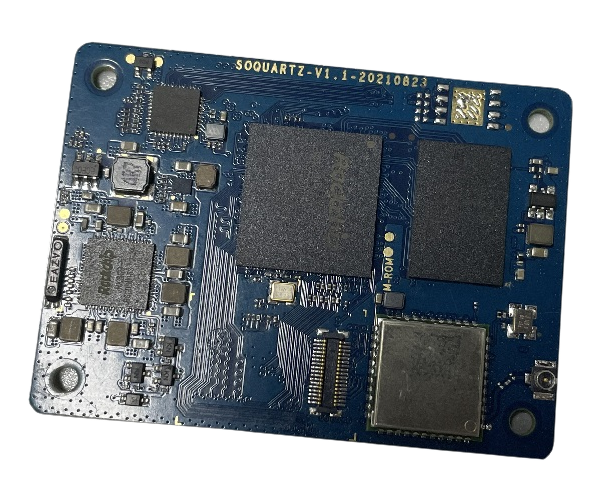](./soquartz-cm.webp)
##### Specifications
##### CPU Architecture
- [Quad-core ARM Cortex-A55@1.8GHz](https://developer.arm.com/ip-products/processors/cortex-a/cortex-a55)
- AArch32 for full backwards compatibility with ARMv7
- ARM Neon Advanced SIMD (single instruction, multiple data) support for accelerated media and signal processing computation
- Includes VFP hardware to support single and double-precision operations
- ARMv8 Cryptography Extensions
- Integrated 32KB L1 instruction cache and 32KB L1 data cache per core
- 512KB unified system L3 cache
##### GPU (Graphics Processing Unit) Capabilities
- [Mali-G52 2EE Bifrost GPU@800MHz](https://developer.arm.com/ip-products/graphics-and-multimedia/mali-gpus/mali-g52-gpu)
- 4x Multi-Sampling Anti-Aliasing (MSAA) with minimal performance drop
- 128KB L2 Cache configurations
- Supports OpenGL ES 1.1, 2.0, and 3.2
- Supports Vulkan 1.0 and 1.1
- Supports OpenCL 2.0 Full Profile
- Supports 1600 Mpix/s fill rate when at 800MHz clock frequency
- Supports 38.4 GLOP/s when at 800MHz clock frequency
##### Neural Process Unit NPU Capability
- Neural network acceleration engine with processing performance of up to 0.8 TOPS
- Supports integer 8 and integer 16 convolution operations
- Supports the following deep learning frameworks: TensorFlow, TF-lite, Pytorch, Caffe, ONNX, MXNet, Keras, Darknet
##### System Memory
- RAM Memory Variants: 2GB, 4GB, 8GB LPDDR4.
- Storage Memory: optional 128Mb SPI Flash and optional eMMC module from 8GB up to 128GB
##### Network
- 10/100/1000Mbps Ethernet
- WiFi 802.11 b/g/n/ac with Bluetooth 5.0
##### Setup
1. Flash the Plebian image to a SD card/ EMMC.
2. Boot.
3. ssh as "pleb/pleb" and complete setup
```bash
sudo usermod -aG sudo pleb
echo "pleb ALL=(ALL:ALL) NOPASSWD:ALL" | sudo tee /etc/sudoers.d/pleb
```
```
sudo hostnamectl set-hostname
sudo dpkg-reconfigure locales
sudo timedatectl set-timezone Europe/Paris
```
```bash
sudo apt update && sudo apt install -y curl wget vim screenfetch rsync python3
# curl -O https://overviewer.org/~pillow/up/75bea78e59/devicetrees-plebian-quartz64-20230601130309-arm64.deb
#
# sudo dpkg -i devicetrees-plebian-quartz64-20230601130309-arm64.deb
# sudo sysctl -w net.core.rmem_default=262144
# sudo sysctl -w net.core.rmem_max=262144
#
# W: Possible missing firmware /lib/firmware/rockchip/dptx.bin for module rockchipdrm
#
sudo mkdir -p /lib/firmware/rockchip/
wget https://raw.githubusercontent.com/wkennington/linux-firmware/master/rockchip/dptx.bin
sudo mv /home/pleb/dptx.bin /lib/firmware/rockchip/dptx.bin
```
```bash
sudo apt install -y cowsay fortune-mod toilet figlet ncal
sudo vim /etc/update-motd.d/01-cowsay
```
```bash
#!/bin/bash
/usr/games/fortune | /usr/games/cowsay -f tux
```
```bash
sudo vim ~/.local/bin/now
```
```bash
#!/bin/bash
# NAME: now
# PATH: $HOME/bin
# DESC: Display current weather, calendar and time
# CALL: Called from terminal or ~/.bashrc
# DATE: Apr 6, 2017. Modified: Mar 30, 2018.
# NOTE: To display all available toilet fonts use this one-liner:
# for i in ${TOILET_FONT_PATH:=/usr/share/figlet}/*.{t,f}lf; do j=${i##*/}; toilet -d "${i%/*}" -f "$j" "${j%.*}"; done
# Setup for 92 character wide terminal
DateColumn=34 # Default is 27 for 80 character line, 34 for 92 character line
TimeColumn=61 # Default is 49 for " " " " 61 " " " "
#--------- WEATHER ----------------------------------------------------------
# Current weather, already in color so no need to override
echo " "
echo " "
curl wttr.in/Rennes?0 --silent --max-time 3
echo " "
echo " " # Pad with blank lines for calendar & time to fit
#--------- DATE -------------------------------------------------------------
# calendar current month with today highlighted.
# colors 00=bright white, 31=red, 32=green, 33=yellow, 34=blue, 35=purple,
# 36=cyan, 37=white
tput sc # Save cursor position.
# Move up 10 lines
while [ $((++i)) -lt 11 ]; do tput cuu1; done
# Depending on length of your city name and country name you will:
# 1. Comment out next three lines of code. Uncomment fourth code line.
# 2. Change subtraction value and set number of print spaces to match
# subtraction value. Then place comment on fourth code line.
Column=$(($DateColumn - 10))
tput cuf $Column # Move x column number
printf " " # Blank out ", country" with x spaces
#tput cuf $DateColumn # Position to column 27 for date display
# -h needed to turn off formating: https://askubuntu.com/questions/1013954/bash-substring-stringoffsetlength-error/1013960#1013960
cal > ~/tmp/terminal
CalLineCnt=1
Today=$(date +"%d")
# Prefix with space when length < 2
if [[ ${#Today} < 2 ]] ; then
Today=" "$Today
fi
printf "\033[32m" # color green -- see list above.
while IFS= read -r Cal; do
printf "$Cal"
if [[ $CalLineCnt > 2 ]] ; then
# See if today is on current line & invert background
tput cub 22
for (( j=0 ; j <= 18 ; j += 3 )) ; do
Test=${Cal:$j:2} # Current day on calendar line
if [[ "$Test" == "$Today" ]] ; then
printf "\033[7m" # Reverse: [ 7 m
printf "$Today"
printf "\033[0m" # Normal: [ 0 m
printf "\033[32m" # color green -- see list above.
tput cuf 1
else
tput cuf 3
fi
done
fi
tput cud1 # Down one line
tput cuf $DateColumn # Move 27 columns right
CalLineCnt=$((++CalLineCnt))
done < ~/tmp/terminal
printf "\033[00m" # color -- bright white (default)
echo ""
tput rc # Restore saved cursor position.
#-------- TIME --------------------------------------------------------------
tput sc # Save cursor position.
# Move up 9 lines
i=0
while [ $((++i)) -lt 10 ]; do tput cuu1; done
tput cuf $TimeColumn # Move 49 columns right
# Do we have the toilet package?
if hash toilet 2>/dev/null; then
echo " "$(date +"%I:%M %P")" " | \
toilet -f future --filter border > ~/tmp/terminal
# Do we have the figlet package?
elif hash figlet 2>/dev/null; then
echo $(date +"%I:%M %P") | figlet > ~/tmp/terminal
# else use standard font
else
echo $(date +"%I:%M %P") > ~/tmp/terminal
fi
while IFS= read -r Time; do
printf "\033[01;36m" # color cyan
printf "$Time"
tput cud1 # Up one line
tput cuf $TimeColumn # Move 49 columns right
done < ~/tmp/terminal
tput rc # Restore saved cursor position.
exit 0
```
```bash
sudo chmod +x /etc/update-motd.d/01-cowsay
sudo chmod +x ~/.local/bin/now
```
```bash
sudo vim .bashrc
```
```bash
...
export PATH="/home/pleb/.local/bin:$PATH"
# Splash Calendar and time
now
# ASCII Linux distribution display
# screenfetch
```
#### Networking
> [Networking](networking.md)
#### Sensors
```bash
sudo apt install lm-sensors fancontrol read-edid i2c-tools libi2c-dev python3-smbus -y
sudo sensors-detect
```
##### Server World
[https://www.server-world.info/en/note?os=Debian\_12&p=download&f=1](https://www.server-world.info/en/note?os=Debian_12&p=download&f=1)